March 27, 2026
What Is Virtual Staging? Complete Guide for 2026
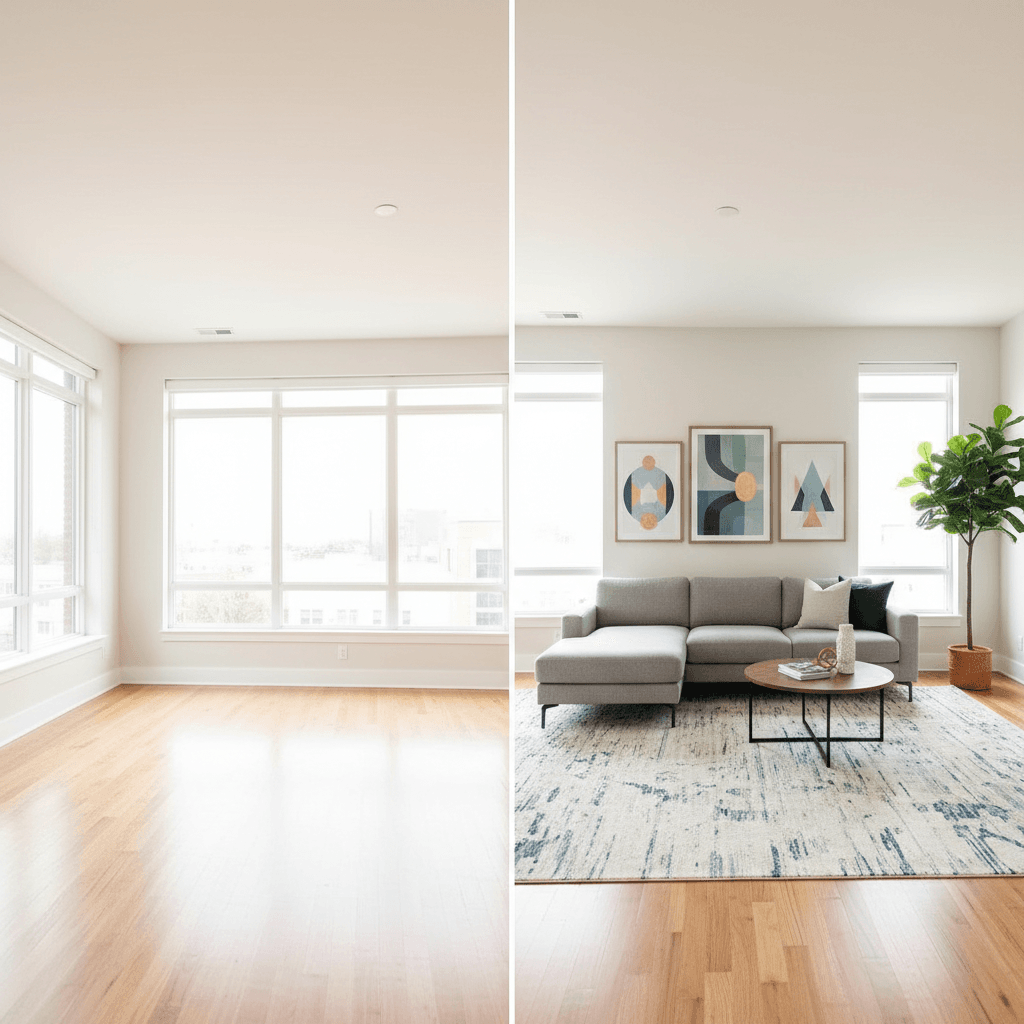
Virtual staging is the process of digitally adding furniture, decor, and design elements to photos of empty or unfurnished rooms. Instead of renting physical furniture and hiring a staging crew, you upload a photo and get back a furnished version — either created by a human designer or generated by AI.
The result is a listing photo that shows buyers what a room could look like furnished, helping them visualize living in the space. And because it's all digital, it's dramatically faster and cheaper than traditional staging.
How Virtual Staging Works
The process depends on whether you're using a manual service or an AI tool, but the basic steps are similar:
- Upload a photo of an empty or sparsely furnished room. The photo should be well-lit and shot from a good angle — just like you would for any listing photo.
- Choose a style. Most tools let you select from design styles like modern, contemporary, farmhouse, Scandinavian, mid-century, or coastal. Some let you specify the room type (living room, bedroom, office, etc.) for more accurate results.
- Processing. With manual services, a designer spends 30 minutes to several hours placing and rendering 3D furniture. With AI tools, a trained model generates the staged version in seconds.
- Review and download. You get back a staged photo ready to use in your listing. If something isn't right, you can request a revision or regenerate.
Virtual Staging vs Physical Staging
Here's how the two approaches compare across the dimensions that matter:
| Physical staging | Virtual staging | |
|---|---|---|
| Cost | $2,000–$5,000+ per listing | $1–$50 per listing |
| Turnaround | 3–7 days | Seconds to 48 hours |
| In-person impact | Yes — buyers see real furniture | No — photos only |
| Style flexibility | Limited by inventory | Unlimited styles instantly |
| Ongoing cost | Monthly furniture rental | None |
| Best for | Luxury listings, open houses | Online marketing, most listings |
The key distinction: physical staging helps with in-person showings. Virtual staging helps with online marketing. Since 97% of buyers start their search online, virtual staging covers the most important touchpoint for the vast majority of listings.
Benefits of Virtual Staging
It helps buyers visualize
Empty rooms are hard to read. Most buyers cannot mentally place furniture and judge proportions from a photo of bare walls and flooring. Staged photos give them a clear picture of how the room functions and how their own furniture might fit.
Staged listings get more engagement
Listings with staged photos receive more clicks, more saves, and more showing requests than those with empty room photos. According to the NAR, staged homes spend 73% less time on the market compared to unstaged homes.
Multiple design options at no extra cost
With physical staging, you pick one look. With virtual staging — especially AI-powered tools — you can generate the same room in modern, farmhouse, and minimalist styles in minutes. This is valuable when you're not sure what will resonate with your target buyer demographic or when you want to show a room's versatility (home office vs guest bedroom, for example).
No logistics
No scheduling movers, no furniture deliveries, no damage risk, no rental extensions when the listing sits longer than expected. Virtual staging is purely digital — upload, process, done.
MLS Rules and Disclosure
This is important: most MLS systems require you to disclose that virtually staged photos are not photos of the actual furnished property. The specific rules vary by MLS, but common requirements include:
- Watermark or label. Many MLS boards require a "Virtually Staged" watermark or caption on staged photos.
- Include unstaged originals. Some boards require you to include the original, unstaged photo alongside the virtually staged version.
- No structural alterations. Virtual staging should add furniture, not change the room itself. Removing walls, adding windows, or altering flooring crosses the line from staging into misrepresentation.
Always check your local MLS guidelines before uploading virtually staged photos. Most boards are very accepting of the practice as long as it's disclosed.
How to Choose a Virtual Staging Tool
Not all virtual staging tools are equal. Here's what to look for:
- Realistic output quality. The staged furniture should look natural in the room — correct scale, proper shadows, accurate perspective, and appropriate lighting. Ask for samples before committing.
- Speed. If you're staging regularly, waiting 24–48 hours per photo creates a bottleneck. AI-powered tools deliver results in seconds.
- Style variety. You need different styles for different properties. Make sure the tool offers a range that matches the listings you handle.
- Pricing model. Per-photo pricing adds up quickly. Subscription models with per-image credits tend to be more cost-effective for regular users.
- Additional features. Does the tool also handle photo enhancement, sky replacement, or other common editing needs? An all-in-one platform saves time and money compared to using separate tools for each task.
ListingScene: Virtual Staging and More
ListingScene is an AI-powered platform that handles virtual staging alongside photo enhancement, sky replacement, and other real estate photo editing tasks. Upload a photo of an empty room, choose a furniture style, and get a staged result in about 10 seconds. Plans start at $8.99/month, with per-image costs as low as $0.09.
If you use Canva for your marketing materials, the ListingStage app on the Canva Marketplace lets you run virtual staging directly inside Canva — no separate tool needed.
Getting Started
Virtual staging is one of the highest-ROI tools available to real estate professionals. It costs a fraction of physical staging, takes seconds instead of days, and covers the most important channel — online listings — where nearly all buyers start.
If you haven't tried it yet, sign up for ListingScene and test it with a photo from your next vacant listing. You get free credits to see the results for yourself.